TL;DR

Get audio and creator gear delivered free — and shop member deals
- Fast, free delivery on millions of items
- Access to Prime Big Deal Days deals on October 6–7
- Prime Video, Amazon Music and more included
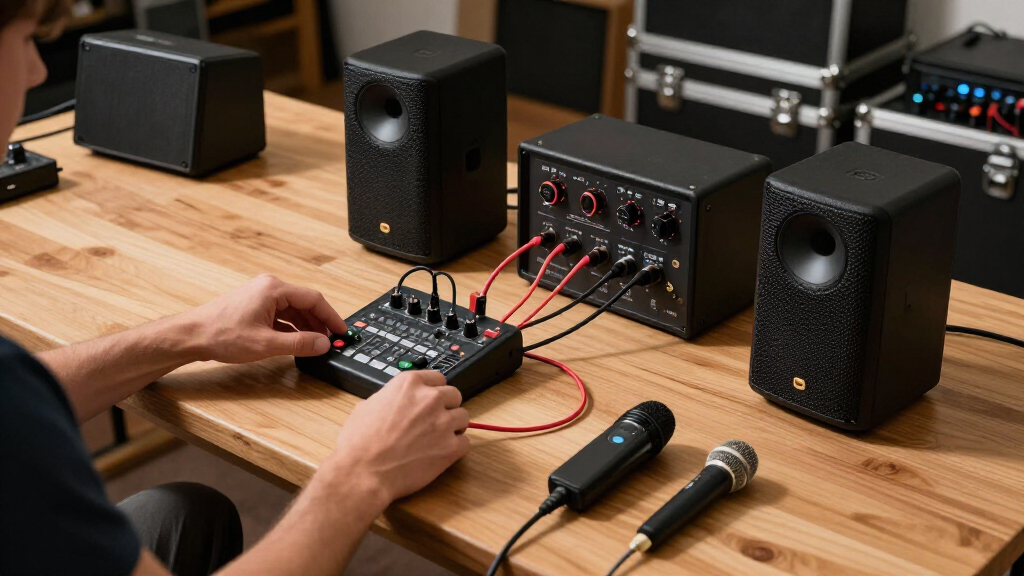
To upgrade your portable PA system, start by diagnosing what’s lacking—volume, bass, or portability. Prioritize impactful upgrades like speakers or subwoofers, then fine-tune with accessories. This method saves money and improves sound quality without overhauling everything.
Ever feel like your portable PA just isn’t loud enough, or sounds muddy outdoors? You’re not alone. Small upgrades can make a big difference, but knowing where to start makes all the difference. This guide walks you through a step-by-step process to upgrade your system without wasting money or effort.
Whether you’re a mobile DJ, a speaker for houses of worship, or a fitness instructor, understanding what bottlenecks to fix helps you get cleaner, louder sound faster. Let’s break down exactly how to upgrade your system in a way that’s practical, effective, and tailored to your needs.
Diagnose your system’s main weakness before upgrading. Know whether you need more volume, bass, or portability.
Prioritize impactful upgrades like larger speakers or adding a subwoofer—these often deliver the best results for your money.
Upgrade in a logical order: fix core issues first, then add accessories or batteries last.
Tune and test thoroughly after each upgrade to ensure real-world improvements and avoid feedback or distortion.
Know when a full replacement makes more sense than incremental upgrades—don’t patch a system that’s fundamentally too small or outdated.
Audio Gear Guide — Upgrade Playbook
How to Upgrade Your Portable PA System, Step by Step
Small upgrades make a big difference — if you fix the right bottleneck first. Diagnose what’s lacking (volume, bass, or portability), prioritize high-impact upgrades like speakers and subwoofers, then fine-tune with accessories. Practical, effective, and tailored to how you actually use your rig.
10×
Amplifier power needed to double perceived loudness
+10 dB
Roughly equals a perceived doubling of loudness
“Coverage and placement often beat raw wattage. Aim the sound before you buy more of it.”
5
Steps in the full upgrade path
4
Bottleneck types to diagnose first
12″
Speaker sweet spot for volume + clarity
1
Well-chosen upgrade beats five minor fixes
Start by diagnosing what’s lacking — volume, bass, or portability. Prioritize impactful upgrades like speakers or subwoofers, then fine-tune with accessories. This method saves money and improves sound quality without overhauling everything.
Step 0 — Diagnose Before You Buy
What’s Actually Holding Your System Back?
Test your setup in real-world conditions — at gig volume, outdoors, with a full battery cycle. Note what fails first: distortion, thin low-end, or setup friction. Each failure points to a specific upgrade.
Bottleneck 01
Weak Coverage / Volume
Sound distorts when you turn up, or your voice doesn’t carry outdoors. Your speakers or amp are underpowered for the space.
Fix: Larger / powered speakersBottleneck 02
Thin, Hollow Bass
Music playback feels flat and outdoor gigs sound hollow. Small drivers can’t project low frequencies properly.
Fix: Add a subwooferBottleneck 03
Limited Inputs / Mixing
Too few channels, no EQ control, no effects or presets. Your mixer is capping what the whole rig can do.
Fix: Better mixer / wireless micsBottleneck 04
Battery Anxiety
The pack dies mid-gig or barely lasts two hours. Outdoor events demand far more runtime than you have.
Fix: Higher-capacity powerBottleneck 05
Cumbersome Setup
Tangled cables, a separate mixer, heavy components. Every gig starts with 30 minutes of friction.
Fix: Stands, cables, wirelessThe Tradeoff
Power vs. Portability
Bigger speakers and subs add weight and size. Balance sound quality against ease of transport before spending.
Rule: Upgrade for your use case1
Diagnose your main weakness before upgrading — volume, bass, or portability.
2
Prioritize impact: larger speakers or a subwoofer deliver the best results per dollar.
3
Fix core issues first; add accessories and batteries last, in logical order.
4
Tune and test after each upgrade to avoid feedback and distortion.
5
Know when full replacement beats patching a system that’s too small or outdated.
The Method
The Five-Step Upgrade Path
Follow the sequence professionals use — assess, define, prioritize, execute, tune. Skipping steps is how money gets wasted.
Assess Your Gear
List specs: wattage, speaker size, weight, battery life, input channels. A 100W / 8″ box suits small indoor events but struggles outdoors. If it clips at gig volume, it’s time to move up.
Define How You Use It
Speech-heavy gigs need clarity and portability. DJs and bands need bass and volume. Outdoor fitness classes need battery life and a mic that won’t cut out.
Pick High-Impact Upgrades
Fix the biggest bottleneck first. Swapping 8″ passives for powered 10–12″ actives can double volume and clarity. One right upgrade beats a mishmash of minor fixes.
Upgrade in the Right Order
Speakers first, then subwoofer, then mixer/wireless, then battery, then accessories. Wrong order = wasted money and suboptimal results.
Test & Tune
Gain staging, EQ, feedback suppression, and speaker positioning. Verify real-world improvement after every single upgrade — not just on paper.
Step 3 — Prioritize
Biggest Bang for Your Buck
Upgrading blindly costs a lot without solving core issues. Pick upgrades based on your most urgent bottleneck — here’s how the options rank by impact and cost.
| Upgrade Type | Impact | Cost | When It’s the Right Move |
|---|---|---|---|
| Speaker size / quality8″ → 10″/12″, passive → active | ✓High — more volume & clarity | Moderate | First move for weak outdoor volume |
| SubwooferThe single biggest perceived quality jump | ✓Very high — big bass upgrade | Moderate–High | Essential for music playback & DJs |
| Wireless mic / better mixerUHF or 2.4 GHz digital; headset/lavalier options | ~Moderate — cleaner sound, easier setup | Low–Moderate | After the core sound is fixed |
| Battery capacitySwappable packs / portable power station | ✓High outdoors — longer gigs | Moderate | Priority for outdoor & fitness use |
| AccessoriesStands, quality cables, cases, cable management | ~Low–moderate — improves coverage | Low | Cheap wins — stands hugely improve clarity |
Impact Visualized
Perceived Improvement by Upgrade Type
Relative real-world impact per upgrade category, based on the most common portable PA bottlenecks. Coverage and low-end dominate.
Step 4 — Execute
Upgrade in the Right Order
Think like an expert: start with the core problem, extend later. Example path — powered 12″ speakers first, Bluetooth subwoofer second, portable power station only if runtime is still a concern.
Speakers
Core volume & clarity fix
Subwoofer
Low-end impact
Mixer / Wireless
Control & flexibility
Battery / Power
Extended runtime
Accessories
Stands, cables, cases
Compatibility & Sequencing Traps
- Subwoofer without capable mains won’t produce the desired impact — the core must come first.
- Match impedance and power when mixing passive components; mismatch risks damage or weak output.
- Check mixer output vs. speaker input types — XLR, 1/4″, Bluetooth — before buying.
- Battery upgrades extend runtime but never fix weak sound — that’s why they come last.
When Full Replacement Beats Upgrading
Don’t patch a system that’s fundamentally too small or outdated. Battery-powered column systems have matured — Bose L1 Pro, JBL EON One Mk2, LD Systems Maui — delivering subwoofer-grade bass in all-in-one packages.
- Bluetooth stereo pairing & app-based remote mixing are now standard
- DSP presets, automatic feedback suppression, firmware updates
- Class-D amps + neodymium drivers = more output per kilogram
- USB-C charging and swappable battery ecosystems
How to Diagnose Your Current System’s Weaknesses
The first step is knowing what’s holding your system back. Is it volume, bass, clarity, or portability? Start by testing your setup in real-world conditions. For example, if your outdoor gigs sound hollow or your voice doesn’t carry, you may need more coverage or bass. Check wattage, speaker size, and how your system performs at gig volume.
Take note of what fails first: is it distortion, lack of low-end, or difficulty setting up? For instance, if your sound distorts when you turn up the volume, your speakers or amp may be underpowered. If your bass sounds thin, a subwoofer might be the key. Diagnosing helps you target the right upgrade.
Understanding why these issues occur is crucial. For example, distortion at high volume often indicates that your speakers or amplifier are not capable of handling the power needed for your space. Lack of bass might be due to insufficient speaker size or placement issues that prevent low frequencies from projecting properly. Recognizing these tradeoffs—such as choosing larger speakers for more bass versus the added weight—guides you to make smarter, more effective upgrades that balance performance with portability.
As an affiliate, we earn on qualifying purchases.
Prioritize Upgrades That Give You the Biggest Bang for Your Buck
Upgrading blindly can cost a lot without solving your core issues. Focus on three main areas: coverage, bass, and ease of setup. For example, moving from 8″ to 12″ speakers can instantly increase volume and clarity. Adding a subwoofer will dramatically improve bass and overall sound quality for music or DJ sets.
Here’s a quick priority list:
| Upgrade Type | Impact | Cost |
|---|---|---|
| Speaker size/quality | High — more volume and clarity | Moderate |
| Subwoofer | Very high — big bass upgrade | Moderate to high |
| Wireless mic or better mixer | Moderate — cleaner sound, easier setup | Low to moderate |
| Battery capacity | High outdoors — longer gigs | Moderate |
| Accessories (stands, cables) | Low to moderate — improves coverage | Low |
Pick your upgrades based on your most urgent bottleneck. For example, if outdoor volume is weak, a bigger speaker or sub might be your best move. But keep in mind the tradeoff: larger speakers and subwoofers add weight and size, which can impact portability. Balance your needs for sound quality with ease of transport, and choose upgrades that align with your most pressing problems for maximum return on investment.
As an affiliate, we earn on qualifying purchases.
Step 1: Assess Your Current Gear — Know Exactly What You Have
Pull out your gear and make a list of specs: wattage, speaker size, weight, battery life, input channels. For example, a typical 100W speaker might be suitable for small indoor events but struggles outdoors. Check your current setup’s real-world performance—do you experience distortion, weak sound, or battery drain?
For instance, if your 8″ powered speakers start clipping at gig volume, that’s a clear sign it’s time to move up. Document your system’s strengths and weaknesses. This baseline guides your upgrade plan.
Understanding your gear’s limitations helps you make more informed decisions. For example, if your battery only lasts two hours, you might need a higher-capacity power source. If your input options are limited, upgrading your mixer could unlock more flexibility. Recognizing these details prevents unnecessary purchases and ensures your upgrades address actual shortcomings, leading to more efficient improvements.
battery-powered portable PA speakers
As an affiliate, we earn on qualifying purchases.
As an affiliate, we earn on qualifying purchases.
Step 2: Define How You Use Your System — Match Up Upgrades with Your Needs
Knowing whether you’re mainly doing speeches, DJ sets, or live bands helps prioritize upgrades. For speech-heavy gigs, clarity and portability matter more. For DJ or band performances, bass and volume are critical.
For example, a fitness instructor doing outdoor classes needs long battery life and a mic that won’t cut out. A wedding DJ, meanwhile, benefits more from a subwoofer for dancefloor impact. Clarify your typical use to avoid wasting money on unnecessary features.
Understanding your primary use cases helps you evaluate the tradeoffs between different upgrades. For instance, investing in a lightweight, portable speaker might sacrifice some volume or bass, but it improves ease of setup and mobility. Conversely, choosing larger, more powerful speakers enhances sound but may make transportation more challenging. Balancing these factors ensures that your upgrades align with your actual needs, maximizing both performance and convenience.
professional portable PA accessories
As an affiliate, we earn on qualifying purchases.
As an affiliate, we earn on qualifying purchases.
Step 3: Pick the Upgrades That Deliver the Most Impact
Focus on the upgrades that fix your biggest bottleneck first. For example, if your outdoor sound is weak, upgrading speakers or adding a subwoofer offers immediate improvement. If setup time is a hassle, new stands or a wireless mic pack might be your best investment.
Remember, a single well-chosen upgrade often beats a mishmash of minor fixes. For instance, swapping your 8″ passive speakers for active 10″ models like the JBL EON615 (around $400 each) can double your volume and clarity. Choosing the right upgrade means understanding the tradeoffs—larger speakers provide more volume and bass but are heavier and less portable. It’s about balancing your needs for sound quality with ease of transport, so you get the most benefit without sacrificing too much convenience.
Step 4: Upgrade in the Right Order — Think Like an Expert
Start with the core problem: if you need more volume, upgrade your speakers before adding extras. Next, consider a subwoofer if bass is weak. Then, improve your mixer or add wireless mics. Battery upgrades come last, since they extend your existing setup’s runtime.
For example, replace your 8″ passive speakers with powered 12″ models first. Once that’s done, add a Bluetooth-enabled subwoofer for bass. Only then, consider a portable power station if battery life remains a concern. This logical sequence saves money and maximizes effect.
It’s important to understand that upgrading in the wrong order can lead to wasted money and suboptimal results. For instance, adding a subwoofer without sufficient main speakers won’t produce the desired impact. Similarly, upgrading batteries before fixing core sound issues might not improve your performance during gigs. Think of it like fixing the foundation before adding decorative elements—each step builds on the last, ensuring your system’s improvements are effective and sustainable.
Step 5: Fine-Tune and Test Your Upgrades
After upgrading, spend time tuning your system. Adjust gain staging, set EQ for clarity, and use feedback suppression tools. For example, place your mic and speakers in the optimal position—raising speakers to ear level often improves clarity more than cranking volume.
Test outdoors and indoors. Walk around, listen for dead spots, and tweak accordingly. Real-world testing ensures your upgrades work as intended and helps you avoid feedback or distortion during gigs.
Remember, thorough testing not only confirms that your upgrades have achieved the desired impact but also reveals any unforeseen issues, such as feedback loops or uneven coverage. Fine-tuning can involve adjusting speaker angles, repositioning mics, or tweaking EQ settings—small changes that significantly enhance overall sound quality and reliability in different environments.
Frequently Asked Questions
How many watts do I really need for outdoor gigs?
Wattage isn’t everything. For outdoor events, focus on coverage and speaker size. Typically, 200-300W active speakers with larger drivers (10-12″) provide enough volume for small to medium outdoor crowds—roughly 100-200 people—if positioned correctly.Should I upgrade my entire system or just parts?
If the core speakers are underpowered or outdated, replacing them usually makes more sense than patching. Upgrading in parts works best when your system’s main components are still solid but need a boost—think bigger speakers or a subwoofer first.Is a subwoofer worth the extra cost?
Absolutely, especially for music-heavy gigs or DJ sets. A subwoofer dramatically improves bass response, making your system sound fuller and more balanced. For speech-only events, it’s less critical.How do I prevent feedback after upgrades?
Position your microphone and speakers carefully—raise speakers above head height and keep mics away from speakers. Use gain controls and feedback suppression tools built into many digital mixers or speakers. Small adjustments make a big difference.Can Bluetooth work reliably for live sound?
Bluetooth is convenient but can suffer from latency and dropout, especially in crowded RF environments. For critical live use, wired connections or digital wireless systems in UHF or 2.4 GHz are more reliable. Use Bluetooth for casual background music or monitoring only.Conclusion
The biggest upgrade you can make is fixing what holds your sound back—coverage, bass, or clarity. Approach upgrades like a pro: step-by-step, prioritize impact, and test thoroughly. Your audience will notice the difference—louder, clearer, more reliable sound every time.
Next gig, imagine your improved system filling the space effortlessly—no feedback, no distortion, just pure, punchy sound. That’s the power of a smart upgrade.
Fall Picks
fall essentials
As an affiliate, we earn on qualifying purchases.