TL;DR

Get audio and creator gear delivered free with Prime
- Fast, free delivery on millions of items
- Prime Video, Amazon Music and more included
- Member-only deals all year
A beginner mobile DJ setup should prioritize portability, reliable sound, and quick assembly. Using specific gear choices and organized routines, you can set up efficiently and sound professional at any event.
Imagine pulling into a venue with a compact bag full of gear — ready to turn any space into a dance floor. That’s the beauty of an efficient mobile DJ setup. It’s about finding the perfect balance between lightweight portability and professional sound quality. If you’re just starting out, the right gear, a bit of planning, and a solid routine make all the difference.
In this guide, you’ll learn exactly what equipment to choose, how to organize it, and some recent tech trends that can make your life easier. Whether you’re doing backyard parties or small weddings, a smart setup saves time, reduces stress, and makes you look like a pro from day one.
Choose lightweight, reliable gear — like the Pioneer DDJ-400 and QSC K8.2 — to cut setup time and improve mobility.
Organize and practice your packing routine to be ready in under 15 minutes, saving time and reducing stress.
Use stands and proper placement for speakers to maximize sound quality without complicating transport.
Invest in portable power options like the Goal Zero Yeti 400 or small generators for outdoor gigs.
Stay updated on new tech, like wireless microphones and all-in-one systems, to simplify your setup and improve performance.
Pick the Right Gear: What Every Beginner Needs in Their Bag
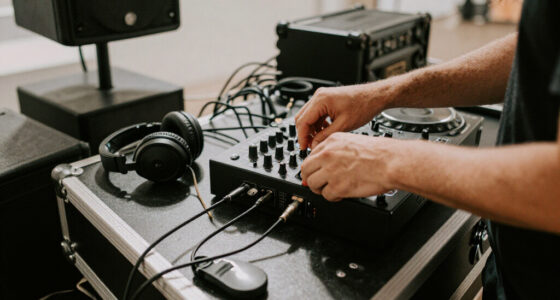
Starting with the right gear is like building a sturdy foundation. For beginners, focus on gear that’s lightweight, reliable, and versatile. A good DJ controller, powered speakers, and a sturdy case are your essentials. Think of your gear as your musical toolbox — each piece should serve a purpose and fit into your carrying plan.
Here’s a quick rundown of must-haves:
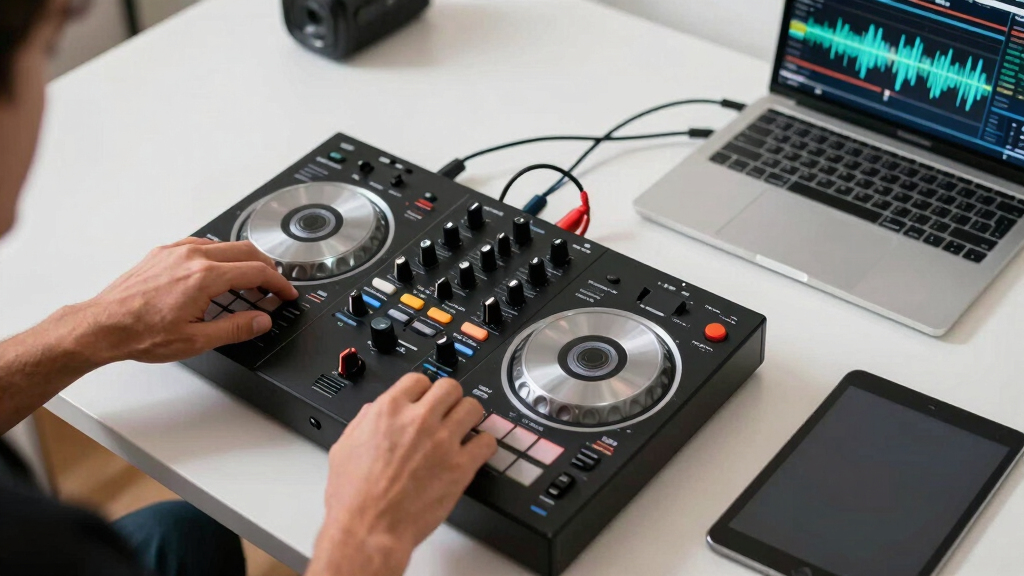
- DJ Controller: For ease and affordability, the Pioneer DJ DDJ-400 (~$250) offers 4 channels, simple layout, and compatibility with most software. Its intuitive controls help beginners learn DJing fundamentals, but it’s lightweight enough to carry easily. This balance of simplicity and portability helps you focus on learning rather than wrestling with complex gear.
- Powered Speakers: The QSC K8.2 (~$700) stands out with 2000W, a compact 13-inch design, and clear sound — perfect for small to medium venues. Powering speakers eliminates the need for external amplifiers, reducing setup complexity and weight. Choosing reliable speakers ensures your sound remains consistent, avoiding the frustrations of blown or inconsistent audio, which can ruin a gig and damage your reputation.
- Laptop or Media Player: A reliable MacBook Air or Windows ultrabook with SSD storage ensures smooth performance. Fast startup times and reliable performance mean less downtime and fewer glitches during your set, which is critical for maintaining a professional image.
- Microphone: A Shure SM58 (~$100) wired mic is a classic, durable choice for announcements and MC duties. Its durability and sound clarity mean you won’t be caught off guard with mic issues, and its versatility makes it suitable for a range of speaking and singing tasks.
- Cables & Accessories: Always carry spare XLRs, power strips, and extension cords. Having backups prevents small technical issues from escalating into gig-stopping problems, ensuring your setup remains seamless and professional.
Choosing gear isn’t just about specs; it’s about understanding tradeoffs. For example, more powerful speakers might sound better but add weight, making transport harder. Conversely, lighter gear is easier to carry but might sacrifice some volume or bass. Balancing these factors based on your typical venues and mobility needs makes your setup both practical and scalable as you grow.
Popular right now

KitchenAid Classic Series 4.5-Quart Tilt-Head Stand Mixer, Onyx Black

Bose QuietComfort True Wireless Earbuds with Active Noise Cancellation, Black

Ninja Flip Toaster Oven & Air Fryer, Large Capacity, Stainless, SP151
As an affiliate, we earn on qualifying purchases.
Optimize Your Space: How to Pack and Organize for Quick Setup
Efficient space management turns setup from a chore into a quick routine. Use padded gear bags and sturdy cases for each component. Label everything clearly so you can grab what you need without rummaging. Practice packing your gear in a logical order — from the heaviest items on the bottom to the most fragile on top.
For example, pack your speakers in a dedicated case like the Gator G-TOUR K8 (~$250), which offers protection and easy stacking. Keep your cables in a separate, labeled pouch. Your controller and laptop should be in padded sleeves to prevent damage.
Visualize your setup: your speakers on stands, controller on a table, cables neatly coiled. This mental picture helps you streamline your process, saving minutes on event day. The more familiar you are with your packing routine, the less time you spend scrambling and the more confident you’ll feel when performing.
Tip: Invest in a foldable cart for transporting gear between your vehicle and the venue. It reduces back strain and speeds up the process, especially when moving multiple items or heavy equipment. This small upgrade can significantly cut down setup time and physical fatigue, allowing you to focus on your performance rather than logistics.
The Power Plan: Keep Your Gear Running Without a Hitch
Power is the backbone of your setup. Always use a surge protector — it shields your gear from voltage spikes that can cause damage or unexpected shutdowns. For outdoor gigs or locations without reliable outlets, portable power banks or small generators become essential. The key is ensuring your equipment stays powered without interruptions, which directly impacts your professionalism and audience experience.
For instance, a Goal Zero Yeti 400 (~$450) can run your controller and speakers for hours, giving you peace of mind. When selecting portable power sources, consider their wattage capacity, run time, and portability. It’s worth investing in a system that can handle your entire setup with some margin for safety.
Tip: Always do a quick power check before each gig. Plug in your gear, turn it on, and listen for any issues. This proactive step can catch potential problems early, saving you from embarrassing failures during a performance. It also helps you get familiar with your power setup, so you know exactly what to expect and how long your gear can run without issues.
Tradeoff considerations include weight versus capacity; larger batteries or generators provide longer run time but are heavier and less portable. Balancing these factors based on your typical gigs ensures you’re prepared without overburdening yourself.
Sound Check Like a Pro: How to Maximize Sound Quality Fast
Sound quality can make or break your gig. Arriving early to do a quick sound check allows you to identify potential issues before guests arrive. Proper speaker placement is critical: place your speakers at ear level, about 3-4 feet off the ground, and aim them toward the dance floor to ensure even sound distribution. Using stands like the On-Stage SS7730 (~$70) makes this process easier and more adjustable, giving you control over coverage and volume.
Testing with your music at typical volume levels helps you gauge how the venue responds. Adjust EQ settings for the environment—outdoor spaces often require more bass to fill the space, while indoor venues might benefit from more treble to cut through ambient noise. Keep your microphone handy for announcements, and test it for clarity, ensuring your voice is heard clearly without feedback or distortion.
Pro tip: Use a small portable sound meter app to measure decibel levels. This helps you avoid over-amplifying, which can disturb neighbors or cause feedback, and under-amplifying, which leaves the audience struggling to hear. Good sound is about placement, volume, and tuning—each element working together to create an immersive experience that keeps the dance floor alive.
Practice Your Setup: How to Save Time at Every Gig
Practice makes perfect — especially when it comes to setup and teardown. Dedicate time to run through your entire process at home, simulating real gig conditions. Time yourself and aim to complete your setup in under 15 minutes. This not only builds muscle memory but also highlights inefficiencies that can be improved.
For example, pack your gear in the order you’ll set it up, so you just unload and connect — no fumbling or guesswork. Use a checklist to ensure nothing gets left behind, reinforcing consistency and confidence. Repeating this process regularly helps you identify the best packing and setup sequence, reducing stress on event day.
During practice, simulate different venue scenarios—like limited space or unexpected obstacles—to prepare for real-world challenges. Practice running power cords, positioning speakers, and loading cables. The goal is to make your setup automatic, freeing you to focus on the music and audience engagement.
Tip: Record your setup process, then review it for efficiency. Small tweaks, like repositioning a speaker or reorganizing cables, can shave minutes off your routine, making your setup smoother and more professional every time.
Stay Ahead with Tech: Trends That Make Mobile DJing Easier
Technology keeps evolving, making mobile DJing more flexible and less cluttered. Wireless microphones and headphones reduce cable chaos, freeing up space and simplifying movement on stage. All-in-one portable DJ systems combine controller, mixer, and audio interface into a single unit, minimizing the number of components you need to carry and set up, which saves time and reduces setup errors.
Battery-powered speakers, like the Bose S1 Pro (~$1100), allow you to perform without relying on external power sources, giving you the freedom to DJ anywhere—beach, park, or remote outdoor events. DJ software with cloud libraries, like Serato DJ Lite or Virtual DJ, streamline playlist management, cueing, and track organization, making your workflow more efficient and less prone to mistakes.
Adopting these tech trends means less fuss and more focus on your performance. For example, a wireless mic setup reduces setup time and keeps your stage tidy, while portable batteries enable you to DJ in locations lacking power outlets. These innovations can elevate your professionalism and adaptability, especially as you gain more gigs and diverse venues.
Frequently Asked Questions
What is the minimum equipment I need to start DJing professionally?
At minimum, you need a DJ controller, powered speakers, a laptop or media device, and a microphone. This setup covers playback, sound, and communication, allowing you to perform at small venues or parties.How do I choose the right speakers for my mobile setup?
Pick powered speakers that match your venue size. For small to medium events, a 10-12 inch speaker with 1000-2000W, like the QSC K8.2, offers enough volume and portability. Always consider ease of transport and sound clarity.What are the best portable DJ controllers for beginners?
The Pioneer DJ DDJ-400 is a favorite for beginners due to its intuitive layout, compact size, and affordability (~$250). It’s compatible with Serato DJ Lite and offers enough features to learn the craft without overwhelming.How can I keep my setup organized and quick to assemble?
Use labeled gear bags and dedicated cases for each component. Practice packing your gear in a logical order, and rehearse your setup routine regularly. This reduces setup time and ensures nothing gets left behind.What are some tips for managing cables and avoiding clutter?
Coil cables neatly using velcro straps, label them, and store in dedicated pouches. Use cable clips or ties to keep things tidy during transport. A clear cable management system speeds up setup and keeps your stage safe and professional.Conclusion
Building an efficient mobile DJ setup isn’t about fancy gear — it’s about smart choices and practice. Focus on lightweight, dependable equipment, organize your gear expertly, and rehearse your routine until it’s second nature. That way, you can step into any venue ready to spin, without stress or delays.
Think of your setup as your musical spaceship — every piece in its right place, ready for blast-off. Keep it simple, stay organized, and let your music do the talking.