
TL;DR

Get audio and creator gear delivered free with Prime
- Fast, free delivery on millions of items
- Prime Video, Amazon Music and more included
- Member-only deals all year
Using the right materials, secure fastening, and thoughtful design in flight case shelves keeps laptops safe during transport. Recent innovations include lightweight composites and modular systems for versatility and protection.
Use impact-resistant, lightweight materials like aluminum or carbon fiber for shelves.
Measure and customize your shelf to fit your specific laptop model snugly.
Secure laptops with straps or brackets that can withstand shocks and vibrations.
Design shelves with ventilation or active cooling for heat-sensitive devices.
Regularly inspect fasteners, padding, and seals to maintain protection.
Best Practices for Using Laptop Shelves in Flight Cases
A well-designed shelf keeps a laptop secure through impacts, vibration, heat, moisture and repeated setup cycles. The winning formula is simple: choose resilient materials, build for a snug padded fit, fasten intelligently and inspect before every trip.
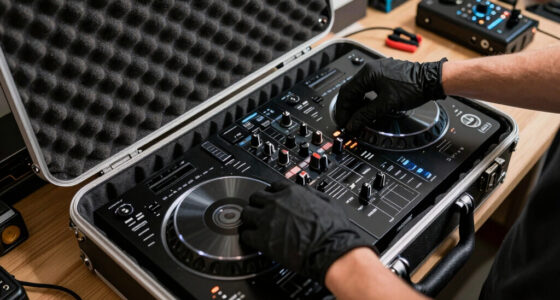
Turn the flight case from a fragile container into a deployable workstation.
Choose materials by the job they must perform
The shelf, padding and fastening system work as one protective assembly. A strong deck without energy-absorbing contact points can still transmit damaging shocks directly into the laptop.
Aluminum alloy
Best all-round choice. A 3 mm aluminum shelf balances rigidity, impact resistance, serviceability and manageable weight for most touring setups.
Carbon fiber
Maximum strength-to-weight. Useful when airline limits or hand-carry weight matter, but cost and repair complexity should be considered.
High-density foam
Absorbs shock and vibration. Use foam at contact points without blocking ports, fans or the laptop’s exhaust path.
Rubberized lining
Reduces sliding and chatter. Thin rubber pads isolate hard surfaces and protect the laptop finish during repeated deployment.
Anti-static surfaces
Control static buildup. Select anti-static foam and liners when exposed connectors, interfaces or sensitive electronics share the case.
Reinforced polymer
Light and adaptable. Quality reinforced plastics suit modular components, cable guides and non-structural shelf accessories.
A secure shelf begins with a repeatable fit protocol
A laptop should not slide, bounce or contact bare hardware. Build enough clearance for cushioning while keeping the device close to the shelf’s center of mass.
Record width, depth, closed height, port locations and ventilation zones.
Add about 0.5 inches to width and depth for protective padding.
Create a device-specific pattern and mark cable and airflow clearance.
Set adjustable brackets, hook-and-loop strips or modular stops.
Simulate lifting, rolling, vibration and rapid setup before travel.
Tight enough to control movement, roomy enough to cushion
The allowance is a starting point, not a universal rule. Confirm the compressed thickness of your foam, protect protruding ports and ensure straps cannot press against the display or restrict airflow.
Control movement, impact, heat and moisture
No single feature provides complete protection. The best systems combine structural support, energy absorption, restraint, ventilation and environmental sealing.
The five-layer defense
Match the shelf system to the travel pattern
Frequent equipment changes favor modularity. Fixed installations favor simplicity. High-performance laptops require deliberate ventilation regardless of shelf type.
| System | Impact protection | Low weight | Reconfiguration | Fast deployment | Best use |
|---|---|---|---|---|---|
| Fixed aluminum | ✓ | ~ | ✗ | ✓ | Dedicated touring laptop |
| Modular aluminum | ✓ | ~ | ✓ | ✓ | Changing AV or DJ rigs |
| Carbon composite | ✓ | ✓ | ~ | ✓ | Weight-sensitive air travel |
| Sliding shelf | ~ | ~ | ~ | ✓ | Rapid workstation access |
| Removable shelf | ~ | ✓ | ✓ | ~ | Portable multi-case kits |
Modern shelves are lighter, smarter and easier to reconfigure
New technology is valuable when it solves a real touring constraint. Test innovations during rehearsals and introduce upgrades in phases.
Lightweight composites
Carbon-based structures can reduce shelf weight while preserving rigidity and impact resistance.
Modular systems
Sliding brackets and movable stops let one case support several laptop and interface combinations.
Active cooling
USB-powered fans and heat-dissipation panels support demanding devices in tightly packed cases.
Smart tracking
RFID tags and electronic locks improve inventory visibility and access control for touring fleets.
Five checks before the case leaves the floor
Maintenance is part of the protective design. Small defects in straps, foam or seals can undermine an otherwise excellent shelf system.
Tighten shelf hardware and confirm brackets cannot loosen under vibration.
Replace frayed straps and test quick-release operation with the laptop installed.
Look for compression, tears, hardened foam and exposed metal contact points.
Clear ventilation slots, confirm fan operation and route cables away from exhausts.
Inspect gaskets, corners and edge seals; keep correctly sized spares available.
Confirm the shelf deploys near waist height without pinching cables or hands.
Quick answers for touring professionals
Use these answers as starting points, then validate the finished case against your exact device, route and handling conditions.
What is the best lightweight shelf material?
Carbon fiber offers exceptional strength at low weight. Aluminum alloy is the practical second choice because it is durable, economical and easier to modify or repair.
How can one case fit different laptops?
Use a modular shelf with movable stops, sliding brackets or industrial hook-and-loop strips. Keep a measurement template for every approved device.
What is the easiest secure fastening method?
Adjustable impact-resistant straps are simple and quick. They should be snug without stressing the display, deforming the chassis or blocking ventilation.
Are modular shelves better for frequent travel?
Usually. They adapt to changing equipment and are easier to replace or upgrade, making them well suited to rental, AV and multi-device touring workflows.
How should a high-performance laptop be cooled?
Provide perforations or slots beneath intake zones, preserve exhaust clearance and add a small powered fan only after passive airflow has been tested.
How often should the shelf be inspected?
Perform a quick inspection before every trip and a documented hardware, padding, seal and alignment check at regular service intervals.
Protect the machine. Preserve the performance.
Prioritize fit, shock isolation, dependable restraint, airflow and maintenance. When those elements work together, the laptop arrives ready to deploy—not merely ready to unpack.
Choose the Right Materials to Keep Laptops Safe and Light
Using the proper materials for your laptop shelf is the foundation of good protection. Lightweight, durable materials like aluminum alloys or reinforced plastics help keep weight down while offering impact resistance. Incorporate high-density foam or anti-static padding to absorb shocks and prevent static buildup.
Practical takeaway: Select a 3mm aluminum shelf lined with foam for impact absorption. Test different materials to balance weight and protection, and document your choices for future upgrades.
Action step: Create a checklist of preferred materials, then test prototypes to evaluate impact resistance and weight before final assembly.
Popular right now

Dyson Ball Animal 3 Upright Vacuum

Ninja Foodi 8-Quart DualZone 6-in-1 Air Fryer, Grey (DZ201)

Bose QuietComfort Wireless Noise-Cancelling Headphones, Petal Pink
As an affiliate, we earn on qualifying purchases.
Custom Fit Your Laptop Shelf for a Snug, Secure Hold
Every laptop has its unique dimensions, and a snug fit is essential for preventing movement that can cause damage during transit. Measure your laptop’s dimensions precisely and create a custom-fit shelf that’s slightly larger (about 0.5 inches wider and deeper) to allow for padding. Use adjustable or modular shelves with Velcro strips or brackets so you can reconfigure for different devices.
Practical takeaway: Use a measuring tape and create a template for each device. When designing or selecting shelves, aim for a fit that’s tight but allows space for padding.
Action step: Develop a standard measurement protocol and keep a record for quick customization in future cases.
Secure Your Laptop with Fasteners That Can Take a Beating
Impacts and vibrations are unavoidable during transit, so securing your laptop is critical. Use adjustable straps, Velcro, or custom brackets designed to withstand shocks.
Practical takeaway: Install impact-resistant straps that can be tightened securely but released quickly when needed. Test different fasteners under simulated transport conditions to ensure they hold firm without damaging the device.
Action step: Create a fastener checklist, and routinely inspect and replace worn straps or brackets before each trip.
Ensure Ventilation and Cooling During Transit
High-performance laptops generate heat, especially during long journeys or when packed tightly. To prevent overheating, design shelves with ventilation gaps or slotted patterns that facilitate passive airflow. For added cooling, consider integrating small USB-powered fans.
Practical takeaway: Measure your laptop’s heat output and design or select shelves with appropriate ventilation features. Test active cooling solutions during practice runs to verify effectiveness.
Action step: Schedule regular checks during transit to ensure ventilation features are unobstructed, and adjust your setup as needed to optimize airflow.
Use Smart Fastening and Padding to Dodge Shocks and Vibration
To prevent internal damage from shocks, incorporate foam inserts, rubberized lining, or shock-absorbing pads beneath the laptop. Secure everything with adjustable straps or impact-resistant brackets.
Practical takeaway: Use memory foam padding at contact points and test different strap tightness levels to find the optimal balance between security and ease of access.
Action step: Schedule regular inspections of padding and fasteners, replacing any worn or loose components to maintain protection.
Design for Easy Access and Ergonomic Handling
Position your laptop shelf at an accessible height—ideally at waist level—to facilitate quick setup and teardown. Use hinged or removable shelves for easier device swapping.
Practical takeaway: Measure your typical working height and design or select shelves accordingly. Test the setup with actual devices to identify any ergonomic issues.
Action step: Adjust shelf height based on user feedback and document the optimal position for future cases.
Protect Your Laptop from External Elements
Weatherproofing your case is essential. Use water-resistant exteriors, sealed edges, and rubber gaskets to prevent moisture ingress. For example, select cases rated IP65 or higher for outdoor gigs.
Practical takeaway: Regularly inspect seals and gaskets, and keep spare seals on hand. Test your case’s weatherproof features in controlled conditions before heading out.
Action step: Maintain a checklist for external integrity, and replace worn seals promptly to ensure continuous protection.
Stay Ahead with the Latest Innovations in Shelf Design
Modern materials like carbon fiber and modular systems are revolutionizing gear protection. Use lightweight composites to reduce weight by up to 40%. Modular shelves allow quick reconfiguration for different gear setups.
Practical takeaway: Invest in a modular, impact-resistant case with smart features like RFID tracking if budget permits. Test these features during practice runs to understand their benefits.
Action step: Evaluate the cost-benefit of new materials and systems, and plan phased upgrades to your existing setup for maximum impact.