TL;DR

Get audio and creator gear delivered free with Prime
- Fast, free delivery on millions of items
- Prime Video, Amazon Music and more included
- Member-only deals all year
In small home spaces, choosing the right gear footprint, controlling sound, and optimizing layout are crucial. A well-arranged setup allows you to practice at low volume, avoid neighbor complaints, and stay comfortable—all in a tight spot.
Choose compact controllers under 50 cm wide and consider all-in-one units to save space.
Use headphones for quiet practice and small monitors placed carefully to improve sound without disturbing neighbors.
Treat your room with foam panels or bass traps at reflection points to tame sound and reduce volume needs.
Keep ergonomics in mind: desk height, cable management, and hearing safety prevent discomfort and damage.
Leverage modern wireless, standalone, and software tools to maximize your space and creative options.
Optimizing Your DJ Setup for Small Home Practice Spaces
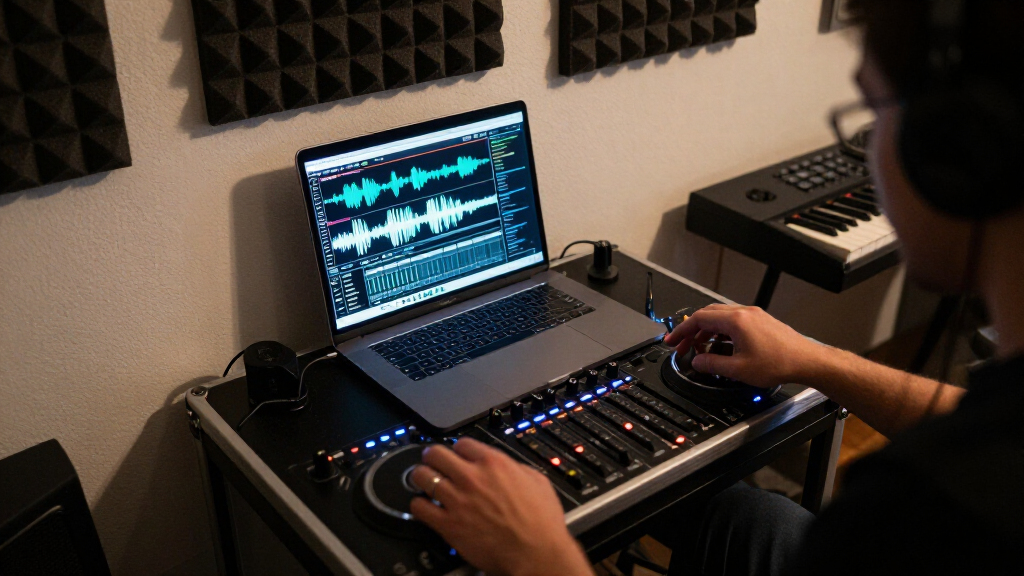
A tiny apartment does not have to limit your skills. Combine a compact footprint, accurate low-volume monitoring, basic acoustic control and an ergonomic layout to turn one cramped corner into a focused creative zone.
Choose only what earns desk space
Start with the smallest complete practice workflow. Add speakers, effects or extra decks only when they solve a real limitation—not simply because an empty socket exists.
Laptop + mini controller
A DJ2GO2 Touch-sized controller and headphones can work on a surface around 60 cm wide, leaving valuable room to move.
Best for portabilityCompact full controller
DDJ-FLX4, DDJ-200 and Traktor Kontrol S2-class gear keeps proper controls while remaining manageable on a 120 cm desk.
Best everyday rigStandalone all-in-one
Battery or Wi-Fi-equipped systems such as Prime Go and Mixstream models remove the laptop and its stand from the workspace.
Best clean surfaceHear more without turning up
Closed-back headphones are the apartment default. When speakers are useful, nearfield placement provides detail at lower levels and reduces unnecessary energy in the room.
Headphones first
Closed-back DJ models isolate cue audio and keep late-night practice private. Moderate cue levels and regular breaks protect against the hidden risk of headphone overexposure.
Nearfields, placed precisely
Place compact monitors close to the listening position, with tweeters at ear height. Avoid corners and shared walls; use pads or stands to stop the desk carrying low-frequency vibration.
Four compact paths compared
The right format depends on whether your priority is minimum size, tactile control, speaker accuracy or independence from a laptop.
| Setup | Space efficiency | Neighbor fit | Tradeoff | Ideal use |
|---|---|---|---|---|
| Software + headphones | Least tactile control | Preparation and timeline mixing | ||
| Mini controller | Smaller jogs and controls | Core transitions and cueing | ||
| Compact controller | Requires laptop space | Complete home practice | ||
| Standalone unit | Higher cost and weight | Fast laptop-free sessions | ||
| Controller + monitors | More cables and vibration | Stereo image and room practice |
Use wired audio for cueing and mixing. Typical Bluetooth latency of 100–200+ ms can disrupt timing and beat alignment.
Treat reflections, contain vibration
Small rooms exaggerate bass and early reflections. Better clarity reduces the urge to raise the volume—but acoustic treatment and soundproofing remain different jobs.
Fix the listening position
Use the 38% rule as a starting point along the room length, then adjust by listening and measuring.
Tame first reflections
Place absorption at ear-level reflection points and behind the monitors to reduce flutter and smear.
Decouple the speakers
Isolation pads or stands reduce desk resonance and structural bass transfer to adjoining rooms.
Skip the subwoofer
Low frequencies travel through building structure most effectively and are a common source of complaints.
Every smart choice supports the next
Comfort is performance infrastructure
Keep controls near elbow height, route cables away from feet and power, and build hearing breaks into every long session.
How to Pick the Right Gear for Tiny Rooms
When space is tight, every inch counts. Compact DJ controllers like the Pioneer DDJ-FLX4 or Numark DJ2GO2 Touch—each under 50 cm wide—slide easily onto a small desk. Consider standalone units like the Denon DJ Prime Go, which eliminate the need for a laptop and save desk space.
Imagine a typical setup: a 120 cm desk with a controller, a small monitor, and a headphone stand. The goal? Keep it simple and clutter-free. Remember, less is more. A laptop with software and a tiny controller can fit on a 60 cm wide surface, freeing up room for movement or additional gear.
Prioritizing essential equipment means understanding what you need versus what’s optional. For example, a compact controller paired with a quality pair of headphones might be enough for routine practice, while additional gear like effect units or multiple speakers can be added as your space and needs grow. This approach helps prevent clutter and allows for easier setup and breakdown, saving time and reducing stress.
Popular right now

Bose QuietComfort Wireless Noise-Cancelling Headphones, Petal Pink

LG 85-Inch QNED73B Mini LED 4K Smart TV (2026)

Samsung 75-Inch M80H Series Mini LED 4K Smart TV (2026)
As an affiliate, we earn on qualifying purchases.
Mastering Sound with Small Monitors and Headphones
In tiny rooms, loudspeakers can quickly become neighbors’ noise. The best move? Use closed-back headphones like the Sennheiser HD 25 or Pioneer HDJ-X5. They isolate sound and let you cue tracks without disturbing others. This is crucial because loud sound in a small space can easily become overwhelming, leading to ear fatigue or accidental disturbance.
If you prefer speakers, pick small nearfield monitors like the Yamaha HS5 or JBL 305P MkII. Placement is key: position them close to your ears, in an equilateral triangle, and avoid corners because walls can cause sound reflections that muddy your mix. Use isolation pads to prevent sound bouncing off your desk, which can exaggerate bass issues and create an unbalanced listening environment. Proper positioning ensures you hear your mix accurately, reducing the need for volume escalation and protecting your hearing.
For example, positioning your monitors 60 cm apart, at ear level, and keeping them 30 cm from walls can drastically improve clarity. This setup minimizes phase issues and reflections, leading to a more accurate soundstage. The deeper understanding of monitor placement helps you develop better mixing skills, especially in confined spaces where acoustics are less forgiving.
Controlling Room Acoustics to Cut the Noise and Improve Sound
Small rooms tend to boost bass and reflect sound wildly, which can distort your mix and increase volume requirements. Using foam panels or bass traps at reflection points can significantly improve sound clarity. Placing them at first reflection points—usually opposite the speakers and near your listening position—reduces echo, flutter echoes, and bass buildup that muddle your sound.
For example, hanging foam panels behind your monitors and at ear level addresses the most problematic reflection points. This not only enhances your ability to hear details but also allows you to lower your volume without sacrificing mix quality. Better acoustics mean less need to push your gear to high volumes, which benefits both your ears and your neighbors.
Remember: acoustic treatment is not soundproofing. It improves what you hear but doesn’t block sound from escaping. To be neighbor-friendly, keep your volume low and use acoustic treatments to maximize clarity at those levels.
How to Practice Without Annoying Your Neighbors
Neighbors and thin walls don’t mix well with loud bass. To keep peace, practice on headphones or keep your monitors at very low volumes. Using nearfield monitors at 70–80 dB usually hits the sweet spot for hearing detail without disturbing others. The key tradeoff is that listening through headphones can sometimes limit your perception of the stereo image and spatial cues, but it’s invaluable for neighbor-friendly practice.
Another tip: decouple your speakers from the desk with isolation pads and avoid practicing late at night, when sounds carry further and neighbors might be more sensitive. Position your speakers away from shared walls and corners to reduce bass buildup and sound leakage. This way, you can still get a good mix without creating noise complaints. Think of it as balancing your need for quality sound with respect for your living environment.
Picture yourself working late, headphones on, and the only sound you hear is your own mix. That’s effective practice without complaints. Recognizing the tradeoffs—such as reduced spatial awareness when using headphones—helps you make smarter decisions about your environment and practice habits.
Ergonomics and Safety in Tight Spaces
Comfort matters—especially when you’re stuck in a small room for hours. Set your desk or DJ deck at about 90–100 cm height if standing, so your back stays straight and muscles aren’t strained. For sitting, adjust your chair and setup to avoid wrist strain and back pain, which can develop over time if ignored. Proper ergonomics reduces fatigue and injury, enabling longer, more productive practice sessions.
Neat cable management isn’t just tidy—it prevents tripping hazards and clutter, which can cause accidents or damage gear. Use Velcro straps or cable sleeves to keep everything organized and accessible. This also makes setup and teardown faster, saving time and reducing frustration.
And don’t forget hearing safety: long sessions above 85 dB can cause permanent damage. Keep cue volumes moderate—ideally below 85 dB—and take regular breaks to protect your ears. Incorporating these practices ensures your environment remains safe and comfortable for extended use.
Choosing Software and Connectivity for Small Spaces
Stick to reliable DJ software like Serato DJ, rekordbox, or Traktor Pro. They run well on laptops, which are perfect for small setups. Use wired connections for audio to avoid latency issues—Bluetooth isn’t suitable for cueing or mixing, as it can introduce delays that disrupt your timing. Wired connections also ensure stable, high-quality sound transfer, which is critical when space and equipment are limited.
Streaming services like TIDAL or Beatport help you access a vast library of music without cluttering your hard drive. Keep your workflow simple: a laptop, a controller, and your headphones or monitors. This minimal setup promotes quick setup and breakdown, so you spend more time practicing and less troubleshooting.
Imagine quick setup, zero fuss, and instant access to all your tracks—this efficiency is vital in small spaces where clutter and time are at a premium. The tradeoff is that relying solely on streaming requires a stable internet connection, so plan accordingly.
Latest Tech Trends That Make Small Home DJ Setups Smarter
New controllers with Wi-Fi or USB-C are game-changers. Standalone units like the Denon SC5000 or Numark Mixstream Pro eliminate the need for a laptop, freeing up space and reducing cable clutter. These all-in-one solutions streamline your workflow and reduce the number of devices you need to manage.
Real-time stem separation in DJ software like Serato and rekordbox opens creative doors without bulky gear—allowing you to remix on the fly or isolate vocals and instruments directly from your controller or software. This innovation enhances your creative potential in confined spaces.
Room correction software like Sonarworks or IK Multimedia can calibrate your monitors and room acoustics, making even modest environments sound more professional. Cloud library syncs allow you to access your music collection from anywhere, making setup and transitions seamless across different rooms or setups. These technological advances help optimize space, improve sound quality, and expand your creative options, all within small environments.
Frequently Asked Questions
What is the minimum gear I need to start DJing at home?
You only need a laptop with DJ software, a compact controller, and headphones. This setup fits on a small desk and provides everything needed to practice and learn the craft.
Which beginner controller is best for a tiny room?
Controllers like the Numark DJ2GO2 Touch or Pioneer DDJ-FLX4 are excellent choices under $300, fitting easily onto small desks while offering solid features for practice.
Can I practice entirely on headphones?
Yes. Headphones are neighbor-friendly and allow precise cueing. However, using small nearfield monitors at low volume gives you better spatial awareness of your mix.
Do I need acoustic treatment?
Basic absorption panels or bass traps at reflection points improve sound clarity in small rooms. Full soundproofing is usually unnecessary and costly; keeping volume low is more effective for neighbors.
Where should I put my gear for the best sound and comfort?
Place your desk near a wall, with monitors at ear level, at an equal distance apart, forming an equilateral triangle. Keep the workspace organized and sit at a height that allows relaxed posture.