TL;DR

Get audio and creator gear delivered free with Prime
- Fast, free delivery on millions of items
- Prime Video, Amazon Music and more included
- Member-only deals all year
Setting up a portable PA system is about choosing the right gear, knowing your venue, and planning power and sound coverage. With this step-by-step guide, you’ll set up quickly and sound great every time — whether outdoors or indoors.
Ever tried to set up sound equipment at a gig, only to realize you forgot a crucial cable or the speaker won’t turn on? Setting up a portable PA isn’t just about plugging in gear; it’s about knowing what to choose and how to make it work seamlessly.
This guide walks you through each step— from selecting the right gear to quick setup tips— so you can deliver crisp sound in any venue, fast. Whether you’re doing a backyard wedding or a street festival, these practical tips keep your focus on the music and the crowd, not the setup.
Always plan based on your venue size and event type—over- or under-equipping can hurt sound or portability.
Opt for active, powered speakers for quick, reliable setup and fewer cables.
Battery life can reach up to 12 hours; always fully charge before gigs and carry backups.
Position speakers on stands, facing the audience directly, for best coverage and minimal feedback.
Test sound thoroughly before the event, adjusting EQ and placement for clarity and coverage.
Step-by-Step Guide to Setting Up a Portable PA
Plan the room, match the gear, manage the power, then tune the coverage. This practical system helps you build clear, reliable sound for everything from a backyard wedding to an outdoor festival—without forgotten cables, dead batteries, or frantic troubleshooting.
Possible for a planned basic system.
Runtime varies with volume and use.
Professional rigs may exceed $1,000.
Position, connect, power, test, tune.
Let the venue choose the system.
Audience size is only the beginning. Room reflections, outdoor noise, event duration, speech-versus-music needs, transport limits, and available power all determine the right balance of coverage and portability.
Read the venue
Note audience position, walls, corners, wind, hard reflective surfaces, and likely dead zones. Outdoors, allow more headroom for background noise and sound dispersion.
Define the program
Speech prioritizes clarity; music requires greater low-frequency output and headroom. Count every microphone, instrument, controller, and playback source before choosing a mixer.
Balance the tradeoffs
Too little power invites distortion. Too much equipment slows transport and setup. Choose the smallest system that delivers clean coverage with comfortable volume headroom.
Suitable for a modest backyard gathering or speech-led indoor event.
A practical balance of volume, clarity, portability, and music playback.
More appropriate for outdoor weddings, larger crowds, and higher output needs.
Build for fewer failure points.
Active speakers place the amplifier inside the enclosure, cutting component count and setup complexity. Add a compact mixer when you need several microphones, music sources, instruments, individual EQ, or independent level control.
| Decision factor | Active speaker | Passive speaker | Portable recommendation |
|---|---|---|---|
| Amplifier | ✓ Built in | ✗ Separate unit | Active reduces the component count. |
| Setup speed | ✓ Fast | ~ More routing | Choose active for rapid mobile work. |
| Cable load | ✓ Lower | ✗ Higher | Fewer links mean fewer failure points. |
| System flexibility | ~ Moderate | ✓ High | Passive suits larger modular systems. |
| Portable use | ✓ Best fit | ~ Specialist fit | Active is the practical default. |
Set up in five easy steps.
Keep levels down while connecting, route cables away from foot traffic, and listen from the audience area—not only from behind the mixer.
Position
Raise speakers on secure stands, aim them toward the audience, and keep microphones behind the speaker line to reduce feedback.
Connect
Plug sources into the mixer and mixer outputs into the speakers. Label cables, seat every connector firmly, and create safe routes.
Power
Set volumes low. Power sources and mixer first, then powered speakers last. Reverse that order when shutting the system down.
Test
Check every microphone and source. Build gain gradually, balance levels, and make restrained EQ adjustments for clarity.
Fine-tune
Walk the venue, identify dead spots or harsh areas, adjust speaker aim, confirm battery status, and secure connections.
Speakers go on last and off first. This helps prevent power-on pops from reaching the loudspeakers and audience.
Runtime is a design decision.
Batteries provide freedom but add weight and impose a time limit. Outlets provide continuous operation but restrict placement. Fully charge before departure, verify real-world runtime, and carry a suitable backup for critical events.
Every good soundcheck begins before arrival.
A reliable portable PA is a connected chain. One weak decision—insufficient power, poor placement, missing adapters, or rushed testing—can compromise the final result.
Charge batteries fully
Pack spare cables and adapters
Raise and aim speakers
Test from several positions
Secure cables and final levels
Start with a Clear Plan: Know Your Venue and Needs
The first step—define what your setup needs to do. Is it a small indoor event or a big outdoor festival? The size and acoustics of your venue shape your gear choices.
For example, a 50-person backyard party might need just one 10″ powered speaker, while a 300-person outdoor wedding calls for a pair of 15″ speakers and a mixer with multiple channels.
Knowing your audience, space, and purpose helps you avoid over- or under-equipping. Think about sound coverage, portability, and power sources. If you’re outdoors, plan for wind and background noise, and consider a speaker with higher wattage.
Choosing the right setup means understanding the implications of your choices. A speaker with too little power may sound weak or distort at high volumes, disappointing your audience. Conversely, oversized gear can be cumbersome to transport and set up, wasting time and effort. Balancing power, portability, and quality ensures your system is effective and manageable.
Popular right now

Apple AirPods Pro 3 Wireless Earbuds with Active Noise Cancellation

Bose QuietComfort Wireless Noise-Cancelling Headphones, Petal Pink

KitchenAid Classic Series 4.5-Quart Tilt-Head Stand Mixer, Onyx Black
As an affiliate, we earn on qualifying purchases.
Pick the Right Gear: Active Speakers, Mixers, and Microphones
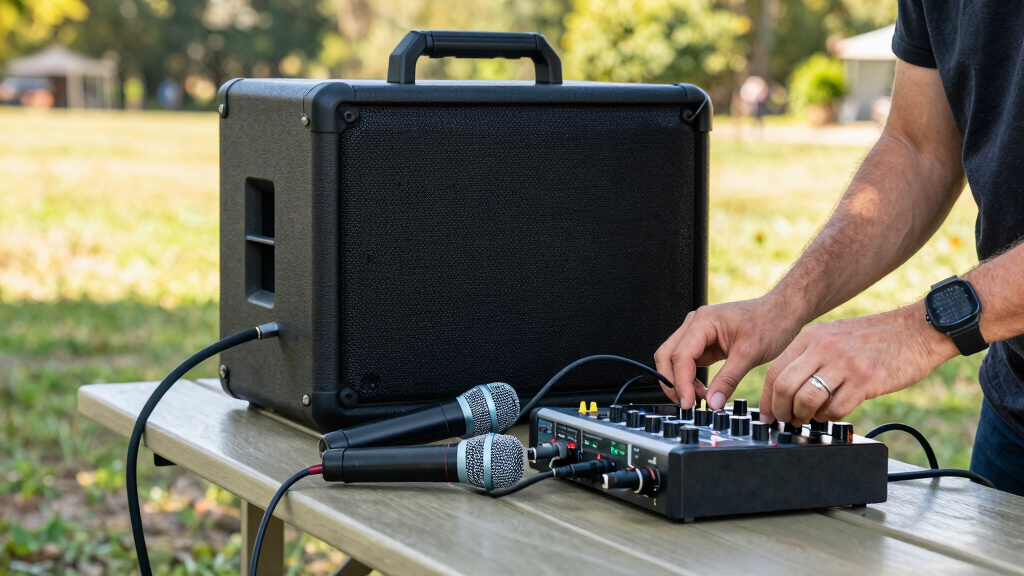
Choosing gear is the backbone of a smooth setup. For portability, active (self-powered) speakers are king—they combine amp and speaker in one box, reducing the number of components you need to carry and connect. This simplicity minimizes setup time and potential points of failure, especially useful when you’re in a hurry or on uneven terrain.
For a typical mobile DJ setup, a 12″ or 15″ active speaker with at least 300W power output offers a good balance of volume and clarity. Pair it with a compact mixer (like the Yamaha MG10XU), which provides multiple channels for mics and controllers. The mixer allows you to control individual sources, apply EQ, and adjust levels, ensuring a balanced sound. The key is to choose gear that matches your venue size and event type—overpowered gear can cause feedback or distortion if not managed properly, while underpowered gear may leave your sound lacking or distorted at higher volumes.
Wireless microphones add mobility and flexibility, especially for speeches or performances, but a wired mic like the Shure SM58 ($100) remains a reliable workhorse—less prone to interference and easier to troubleshoot. Using quality stands, cables, and a sturdy case or bag for transport protects your gear and makes setup faster. Investing in good quality equipment and accessories pays off by reducing the need for repairs and replacements, and by giving you more control over your sound quality.
Plan for Power: Batteries or Outlets?
Power is critical. Most portable PA systems run on rechargeable lithium-ion batteries, giving you 4-12 hours of use. For outdoor gigs, a fully charged battery is your best friend, enabling you to move freely without worrying about outlets or extension cords. The tradeoff is that higher-capacity batteries add weight and cost, so selecting a system with an optimal balance between runtime and portability is key. For instance, the Bose S1 Pro offers about 11 hours of battery life, which is sufficient for most events, but always check your gear’s specifications to match your needs.
Always carry a backup power bank or spare batteries if possible, especially for longer events. This ensures uninterrupted sound and prevents last-minute panic. If your setup is near power outlets, ensure your cables are long enough to reach safely without creating trip hazards. Use extension cords carefully—preferably outdoor-rated and grounded—to prevent electrical issues. Proper power planning minimizes delays and technical problems, keeping your event running smoothly and professionally.
Choosing between batteries and outlets involves understanding the tradeoffs: batteries offer mobility but limited runtime and added weight, while outlets provide unlimited power but restrict movement. Your decision should align with your venue, event duration, and mobility needs, ensuring you have reliable power without sacrificing convenience.
Set up in 5 Easy Steps
- Position your speakers: Place them on stands or sturdy surfaces, angled for even sound coverage. Keep one facing the audience and the other for stereo or fill. Proper positioning maximizes sound clarity and minimizes feedback. Elevating speakers on stands helps project sound over crowds and prevents sound absorption by the ground, which can muffle audio. Consider the acoustics of your venue—placing speakers too close to walls or corners can cause reflections and echo, degrading sound quality. Walking around your setup during testing helps identify dead spots or feedback issues, allowing you to adjust placement for optimal coverage.
- Connect your gear: Plug in the mixer, microphones, and source devices. Use quality cables—XLR for mics, 1/4″ or RCA for music. Proper cable management prevents accidental disconnections and reduces interference. Label your cables beforehand for quick identification, saving time during setup. Ensuring secure connections reduces the risk of sound drops or noise, which can be distracting during an event. Planning your cable routes also avoids tripping hazards and makes teardown easier.
- Power up: Turn on the speakers first, then the mixer. Confirm all connections are secure. Powering in this order prevents feedback or popping sounds that can occur when equipment is turned on in the wrong sequence. Double-check that volume levels are low before powering on to avoid sudden loud noises that could damage your gear or startle your audience. Testing connections at this stage ensures everything is functioning correctly before you proceed to fine-tuning.
- Test sound: Speak into the mic and play some music. Adjust volume and EQ to get a balanced sound. Listening from different parts of the venue reveals how well the sound disperses and where adjustments are needed. Use EQ controls to cut harsh frequencies or boost bass, tailoring the sound to the environment. A well-tuned system reduces feedback and improves clarity, making your event more enjoyable for everyone.
- Fine-tune and go: Walk around your setup, check for dead spots or feedback, and make final adjustments. Small tweaks during this phase can significantly improve sound coverage and quality. Confirm that all mics and sources are working properly, and that your levels are balanced. Once satisfied, secure all connections and prepare for your event. Being thorough at this stage prevents issues during the performance, ensuring a smooth, professional experience for both you and your audience.
Maximize Sound Quality and Coverage
Sound quality depends on placement and settings. Use the mixer’s EQ controls to cut harsh frequencies or boost bass. Keep microphones away from speakers to prevent feedback.
For outdoor settings, elevate speakers on stands and face them toward the audience—avoid placing them on the ground where sound can be muffled or absorbed. Proper placement ensures that your sound reaches the entire audience evenly and clearly. Elevating speakers reduces sound absorption by the ground, especially in outdoor environments, which can otherwise diminish volume and clarity. Facing speakers directly at the audience minimizes reflections and echoes, improving intelligibility. Remember, a single well-positioned speaker can outperform two poorly placed ones, so testing different positions before the event starts ensures optimal coverage and minimal feedback.
Testing your sound in various parts of the venue helps identify weak spots or feedback-prone areas. Making these adjustments in advance prevents surprises during the event, ensuring all attendees experience clear, balanced audio.
Troubleshooting Common Setup Problems
Ever had a mic that cuts out or a speaker that crackles? Here’s a quick fix guide:
- No sound: Check all connections, make sure speakers are powered on, and volume is up. If issues persist, verify that your source devices are functioning properly and that your mixer channels are not muted or turned down.
- Feedback: Move the mic away from the speaker or adjust EQ settings to reduce problematic frequencies. Using directional microphones can also help minimize feedback, and some systems have feedback suppression features—learn to use them effectively.
- Battery issues: Recharge or swap batteries if your system supports it. Regularly monitoring battery status during setup prevents sudden power loss during the event.
- Distorted sound: Lower the volume, check for loose cables, and avoid overdriving your speakers. If distortion persists, consider reducing the input gain or EQing problematic frequencies.
Being ready with these fixes and understanding their causes allows you to quickly troubleshoot and resolve issues, preventing disruptions and maintaining a professional appearance during your event.
Frequently Asked Questions
How long does a portable PA battery last?
Most systems offer between 4 and 12 hours of runtime on a full charge. For outdoor gigs, choose a system like the Bose S1 Pro, which provides around 11 hours, to keep your sound going all day.
Can I use my smartphone with a portable PA system?
Yes. Many modern portable PA systems include Bluetooth or auxiliary inputs, making it easy to stream music or control playback directly from your phone or tablet.
What’s the best way to prevent feedback during a gig?
Position microphones away from speakers, use directional mics, and utilize built-in feedback suppression or EQ controls. Testing the sound before your event helps catch issues early.
How do I pick the right speakers for outdoor events?
Choose powered speakers with at least 300W of power, positioned on stands facing the audience. Elevating speakers and using high-wattage models like JBL EON610 ensures wide, clear coverage outdoors.
Conclusion
Getting a portable PA ready isn’t about fancy gear alone — it’s about knowing what to choose, how to set it up quickly, and fine-tuning for the best sound.
With these steps, you’ll be ready to deliver clear, powerful sound at any location—no stress, just music and good vibes. Remember: a confident setup makes every event memorable.