TL;DR
Portable DJ controllers give you physical controls for mixing digital music, while DJ software or an onboard system handles playback and music libraries. Before buying, check the full packed weight, computer requirements, software support, power options, and audio outputs; a small controller can still need a laptop, speakers, headphones, cables, and a case.
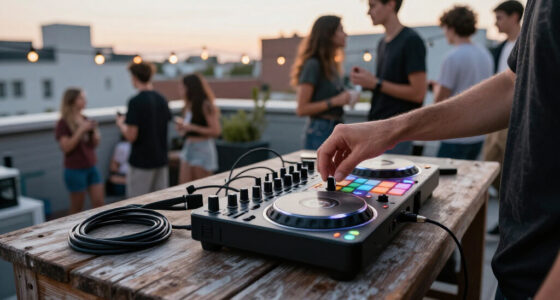
A controller can fit under one arm and still leave you carrying a laptop, headphones, a power adapter, and a coil of cables. That is the small, bittersweet surprise of portable DJ gear: the deck may be compact, while the complete setup fills a backpack.

Get audio and creator gear delivered free with Prime
- Fast, free delivery on millions of items
- Prime Video, Amazon Music and more included
- Member-only deals all year
Portable DJ controllers let you mix digital music using physical controls such as jog wheels, faders, pads, and knobs, while software handles playback, effects, and library management. Some need a computer or mobile device; standalone systems can play without a computer.
This guide helps you compare the whole setup, not just the controller’s footprint. You’ll learn what connects to what, what to check before a purchase, and how to match a two-deck or standalone rig to real travel and gig needs.
Compare packed dimensions and weight, including the case, computer, cables, headphones, and power supply.
Confirm which software, operating system, computer, phone, or tablet the exact controller supports.
Check headphone, main audio, and microphone connections against the equipment at your venue.
A two-deck layout can cover basic mixing; extra decks and pads make sense when your set uses them.
Treat streaming and battery life as features to verify, and prepare a dependable local music source for gigs.
Know what a portable DJ controller actually controls
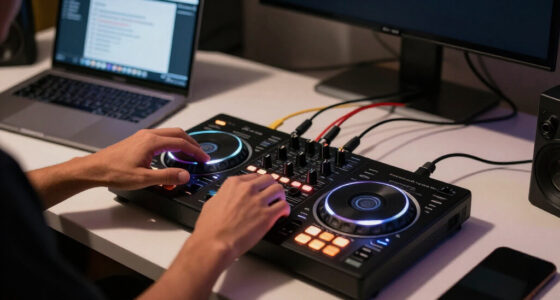
A portable DJ controller is a hardware surface that sends commands to DJ software or an onboard system, which plays and mixes your music. Jog wheels, tempo faders, performance pads, and knobs give you hands-on control; the unit does not automatically contain a music library or act as a complete sound system.
That distinction matters when you’re packing for a set. A beginner might bring a compact two-deck controller to a friend’s kitchen, then discover it still needs a laptop for playback and powered speakers for the room. Think of the controller as the dashboard of a car: it gives you the controls, but it doesn’t supply the road or fuel.
A mixer combines audio signals from connected sources, but may not control DJ software. A CDJ or media player plays tracks from media or a network and often pairs with a separate mixer. A standalone system may look like a controller, yet can mix without a computer because playback and music-library access happen on the unit itself.
These differences shape what you buy and carry. If you already own a laptop and want a familiar software workflow, a laptop-focused controller may suit you. If setting up a computer at every event feels like bringing a filing cabinet to a picnic, compare standalone systems and check how they access your music.
Key point: Controller hardware, DJ software, music files, and speakers do different jobs. Check which pieces your setup still needs before you judge how portable it is.
Popular right now

Ninja Foodi Smart Dual Heat Air Fry Oven, 13-in-1, Silver, SP351

Dyson Cyclone V10 Origin Cordless Vacuum

Breville Barista Express Espresso Machine, Black Truffle
As an affiliate, we earn on qualifying purchases.
Measure the whole rig before you call it portable
Portable DJ controllers are easier to compare when you check the full load: controller, protective case, power supply, computer or mobile device, headphones, cables, and any stand you need. There is no single standard for “portable,” so a small chassis alone doesn’t tell you how manageable your trip will be.
Imagine you’re taking a train to a birthday gig. The controller sits neatly in your backpack, but its case adds bulk, the laptop needs its own sleeve, and the power brick turns a light setup into an awkward shoulder load. Measure your bag’s interior and check the packed weight, not just product photos or bare-unit specifications.
Small layouts also trade space for portability. Tighter spacing, shorter jog wheels, or fewer controls can make a controller easier to stow but slower to use if you have large hands or rely on precise wheel work. A table helps you compare the tradeoffs that actually affect setup:
| Check | What it tells you | Gig example |
|---|---|---|
| Dimensions and packed weight | Whether your case and bag can carry the full setup | Train travel with a laptop and headphones |
| Power requirement | Whether you need an outlet, powered hub, or battery plan | Outdoor patio set with limited outlets |
| Audio outputs | Whether you can connect to the venue’s speakers or mixer | Small RCA input at a home party |
| Control layout | Whether the spacing and jogs suit your hands and mixing style | Long practice session with frequent cueing |
For a commute by car, a slightly larger unit may be an easy choice if it gives you roomier controls and sturdy knobs. For a crowded train, you may value a compact footprint more. Portability is a fit question, like choosing shoes for the route you’ll actually walk.
Choose laptop, phone, or standalone playback for your gigs
Portable DJ controllers differ most in what runs the music: many need a laptop or mobile device, while standalone systems can play without a connected computer. Check the exact controller, operating system, app, and software support before you buy, because the word “controller” alone doesn’t guarantee compatibility with your preferred setup.
If your laptop already holds a carefully tagged library, a laptop-focused unit can slot into your workflow like a familiar tool in a well-used kit. You’ll need to confirm that the controller supports your DJ application and that the software runs on your computer’s current operating system. Included software may come with a license, unlock features when connected, or require a separate purchase or subscription.
Phone and tablet support varies too. A small controller that works with one app on one operating system may not work the same way with another device. For example, before taking an iPad-based rig to a beach event, confirm that the connection, app features, and music source all work together without relying on an unstable data connection.
Standalone gear can reduce dependence on a laptop, but you still need to learn how it accesses tracks. Some systems use local storage or removable media; service support and cloud libraries vary by device, software, region, and subscription. Streaming can be handy at home, but track availability and offline access can change, so a gig built around a weak venue Wi-Fi signal is a gamble.
Write down your current computer or device, preferred software, and music source before shopping. Then check the manufacturer’s current compatibility information and test your actual workflow where possible. A feature list matters less than knowing your tracks will load and play on gig day.
Check the audio connections and power you’ll need on site
A portable controller needs the right connections and reliable power to work in a real room. Look for a headphone output for cueing tracks, the main audio outputs your speakers or venue mixer accept, and a microphone input if you plan to make announcements.
Picture a quiet setup at home: you plug in headphones and cue the next track before anyone hears it. At a party, that same controller must send sound to speakers, perhaps through RCA or balanced XLR connections. A missing output type can mean an extra adapter, another cable to pack, and one more point of failure while guests wait for music.
Many controllers have no built-in speakers. Your complete system may need powered speakers, or a connection to a venue sound system. Check whether you need RCA, XLR, or an adapter, and confirm where the headphone and microphone jacks sit. Compact panels can place ports close together, making a tidy cable run harder than it looks in a product image.
Power brings another tradeoff. USB-powered units can draw from a laptop, while some setups need a powered USB hub; battery-powered or battery-compatible models can help outdoors, but actual battery life depends on the device and how you use it. A USB-C socket does not by itself tell you how the controller handles power or whether it can run untethered.
For a park set, plan for both playback and power: locally stored music, a charged device if supported, suitable speakers, and cables that reach your setup spot. Treat wireless or battery operation as a practical option to verify, not a substitute for a dependable wired audio path at a paid gig.
Before the gig: Match the controller’s outputs and power needs to the actual speakers, mixer, outlets, and cables at your venue.
Match the number of decks and controls to your mix
A two-deck portable DJ controller gives many beginners enough room to learn cueing, beatmatching, transitions, and basic effects. Extra decks, pads, looping controls, and effect knobs can serve more complex workflows, but add controls to learn and space and weight to carry.
If you’re practicing at home and playing straightforward sets at small events, two decks can cover a lot of ground. You load one track, cue the next in headphones, and blend between them. It’s like learning to cook a few reliable dishes before buying a kitchen full of specialty tools: you can make the meal without every extra feature.
A more involved set may benefit from extra performance controls. You might use pads to trigger cues or samples, or loop sections while layering another track. Before choosing a bigger surface, ask whether those controls solve a real problem in your sets. If the extra pads mostly collect dust, they cost you carrying space without making your performance easier.
Feel matters as much as feature count. Sturdy knobs and faders, responsive pads, readable labels, and spacing that suits your hands all help during a long set in dim light. Try the layout if you can, or study close-up images and manuals. A knob that feels fine during a five-minute demo can become irritating after two hours of adjustments.
Think about the music you actually play and the transitions you want to make. For a mobile DJ who handles requests and keeps the dance floor moving, a reliable two-deck layout may be a strong fit. For a performance-focused set built around samples and loops, extra controls can earn their place.
Build a gig-ready travel setup with a quick packing check
A travel-ready DJ setup works when each part has a clear job, fits your bag, and connects to what you’ll find at the venue. Before you leave, check the controller, music device, headphones, speaker connection, power plan, and protective case as one system.
For instance, imagine a café set in a room with a small mixer behind the counter. You have a compact controller, laptop, headphones, and a case, but the venue accepts only XLR from the DJ position. If you didn’t check the connection ahead of time, a missing cable can turn a smooth arrival into a hurried search through your bag.
- Confirm playback: Check that your controller works with your computer, phone, or standalone library, and that your music is available locally if internet access is uncertain.
- Pack the signal path: Bring headphones, the correct main audio cable or adapter, and a microphone cable if you need one.
- Plan power: Pack the supply or charging gear the setup requires, and check whether a USB hub or accessible outlet is needed.
- Protect the controls: Use a case that shields jog wheels, knobs, and faders, then check the combined packed weight.
That checklist also helps you price the real setup. A controller’s purchase price may not include software, a laptop, headphones, speakers, cables, adapters, or a case. Add the pieces you don’t own before you compare budgets; the least expensive deck can lead to a more expensive complete rig.
Keep locally stored tracks you’ve prepared for the event, and test your audio chain before guests arrive. A five-minute check in an empty room is far less stressful than troubleshooting a silent output when the first request comes in.
Frequently Asked Questions
Can I DJ without a laptop?
Yes, if you use a standalone system that supports playback without a connected computer, or another compatible device and app. Check how that specific system accesses music and whether it supports your preferred local library or service.
Can I connect a portable DJ controller to my phone or tablet?
Sometimes. Compatibility depends on the controller, DJ app, operating system, and connection, so confirm the exact device pairing before you buy. Test your music library on the setup you plan to take to the gig.
Do portable DJ controllers come with software?
Some include a software license or unlock certain features when connected; others require a separate purchase or subscription. Check the manufacturer’s current compatibility and license details, including support for your computer’s operating system.
Do I need separate speakers?
Usually, yes: many controllers route sound to speakers but do not include them. Check the main outputs and bring the cable type your speakers or venue mixer accepts, such as RCA or balanced XLR.
Is a two-deck controller enough for a beginner?
For learning cueing, beatmatching, and basic mixing, two decks are enough for many beginners. Extra decks and pads help when your music and performance style use those controls; they also add layout complexity and carrying bulk.
Conclusion
Choose your portable DJ controller by starting with the gig: what will run your tracks, what connects to the speakers, and how far you’ll carry the whole setup. Check the exact dimensions, power needs, software support, and controls against that plan.
A good travel rig feels less like luggage and more like a well-packed instrument case: everything has a place, and when the room fills with music, you can focus on the mix.