TL;DR

Get audio and creator gear delivered free with Prime
- Fast, free delivery on millions of items
- Prime Video, Amazon Music and more included
- Member-only deals all year
A lightweight DJ station for small venues relies on a controller or all-in-one unit, powered speakers, and simple cabling. Prioritize portability, sound clarity, and ease of setup to keep your gigs smooth and quick.
Imagine walking into a cozy bar or a boutique cafe. The sound system is modest, but the vibe is lively. You want to bring your music without lugging a giant case of gear. That’s where a lightweight DJ station becomes your best friend.
In this guide, you’ll learn how to assemble a setup that’s easy to carry, quick to set up, and loud enough to energize small crowds. Whether you’re just starting out or refining your mobile DJ game, these tips will help you keep your gear simple, reliable, and ready for action.
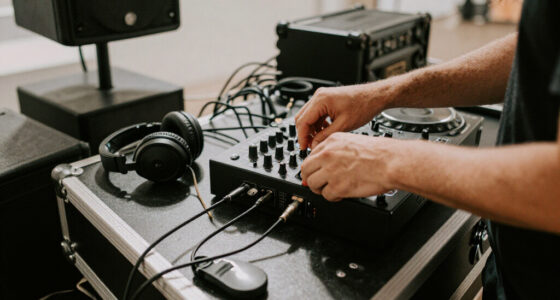
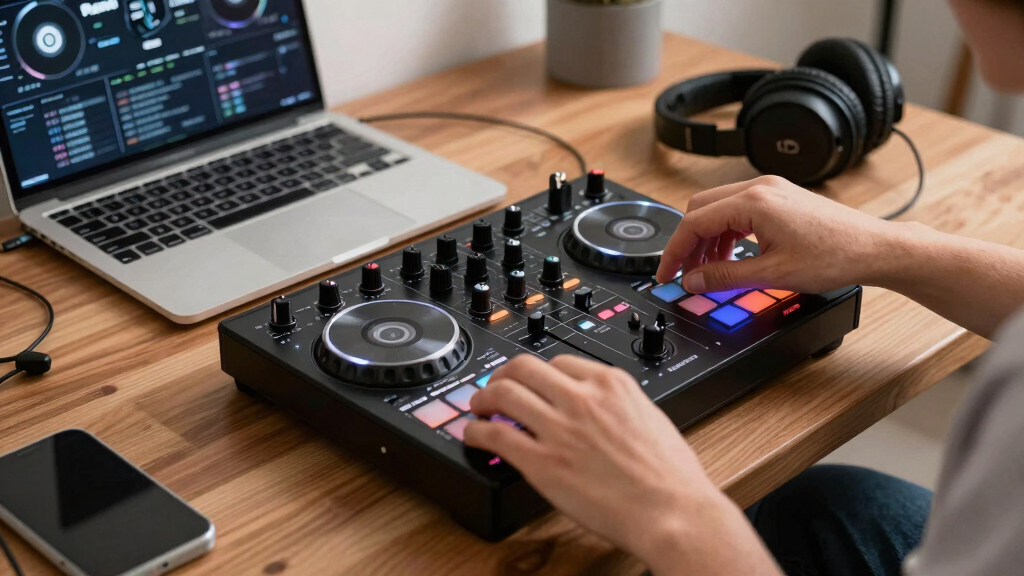
Choose a lightweight, feature-rich controller that includes a built-in sound card—models like the Pioneer DDJ-SB3 or Numark Mixtrack Pro 3 are ideal.
Pair your controller with two compact, powerful powered speakers (8-12") for clear coverage in small venues.
Keep cables organized and use balanced connections to prevent hum and noise. Carry spare adapters for quick fixes.
Set your gain staging properly—aim for meters peaking around 0 dB—to avoid distortion and feedback.
Budget around $700–$1,200 for a complete, reliable setup that balances portability, power, and durability.
Mobile DJ Field Guide — Small Venues
Setting Up a Lightweight DJ Station for Small Venues
Cozy bars, boutique cafés, rooms of 50–150 people — you don’t need a road case to move a crowd. A controller with a built-in sound card, a pair of powered speakers, and disciplined cabling fit in one backpack and go from door to first track in minutes.
01 — The Core Kit
Three components, one backpack
Prioritize portability, sound clarity, and speed of setup. Every piece below earns its place by doing double duty — the controller is also the sound card, the speakers are also the amplifiers.
DJ Controller
Pioneer DDJ-SB3 · Numark Mixtrack Pro 3
The heart of the rig: decks and mixer in one 2–4 kg unit that slips into a backpack or small case.
- Built-in sound card — no extra audio interface
- Balanced master out plus multiple outputs
- Jog wheels & performance pads for creative transitions
- Serato / Rekordbox / VirtualDJ compatibility
Powered Speakers
JBL EON610 · Yamaha DXR8
Active speakers mean no separate amplifier. A pair on stands, slightly toed-in, covers small rooms evenly.
- 8″–12″ drivers for rooms of 50–150 people
- 500–1000 W peak — loud, clean headroom
- Under 15 kg each — one-person load-in
- Balanced XLR/TRS inputs; wide dispersion pattern
Accessories
Flight case · On-Stage LS7750 stands
Think simple: everything protected, everything organized, nothing heavier than it needs to be.
- Padded bag or flight case for the controller
- Collapsible speaker stands — ear-height placement
- Cable pouch & Velcro straps — no tangles, no trips
- Surge protector for limited venue circuits (<10 A draw)
02 — Wiring & Levels
Signal chain, end to end
One balanced run per speaker, adapters in the pouch, gains staged before the doors open. Clean signal in — clean sound out.
Source
Laptop or USB media. 8 GB RAM and a modern CPU handles most libraries; streaming works where venue Wi-Fi is reliable.
Control
Controller’s built-in sound card. Master out via balanced XLR or TRS — the hum-and-noise killer in small rooms.
Connect
One XLR per speaker. Carry RCA–¼″ and ⅛″–XLR spare adapters; strap every cable with Velcro.
Output
Speakers at ear height, slightly toed-in, away from walls — less boom, less feedback, even coverage.
Gain staging: peak at 0 dB, never red
The #1 beginner sound problemStart channel volume at 50%, raise gains on a familiar track until meters peak just below clipping, then set master at 50–70% for the room. Soundcheck with a friend; cut boomy bass or squealing highs with EQ. A limiter on the master protects both speakers and neighbors.
03 — Load-In Math
Where the weight goes
A complete small-venue rig — controller, speaker pair, stands, and cabling — stays at or under 20 kg. One trip from the car, one person, no assistance needed.
04 — Spend Smart
Budget tiers compared
For a reliable small-venue setup, expect $700–$1,200. Prioritize a solid controller and two quality powered speakers — cheap gear compromises build and sound, and costs more in early replacements.
| Component | Entry~$500–800 | MidSweet Spot~$1,200–2,000 | Premium Portable$2,500+ |
|---|---|---|---|
| Controller | Budget 2-channel with built-in sound card | Club-standard feel, pro jog wheels & pads | Standalone all-in-one — no laptop required |
| Speakers | One pair of 8″ powered speakers | 10″–12″ powered pair, high headroom | Higher-SPL tops plus dedicated processing |
| Subwoofer | ✗ Skip it at this tier | ~ Optional compact sub for bass-heavy sets | ✓ Included, matched to tops |
| Lighting | ✗ Not yet | ~ Sound-active LED bar, no DMX needed | ✓ Compact moving heads & effects |
| Best For | First bar & café gigs, tight budget | Regular 50–150-person rooms, weekly mobile work | Premium mobile & event bookings |
05 — The Working Chain
Five habits, zero chaos
“Modern DJ controllers weigh as little as 2 kg and include built-in sound cards — the entire front end of a small-venue rig now fits in a backpack.”
Key Insight — Verify current models, prices & software versions before publishing
Choose the right controller: small, powerful, and versatile
The heart of your lightweight DJ station is your controller. Look for models like the Pioneer DDJ-SB3 or Numark Mixtrack Pro 3. These units weigh between 2-4 kg, fit comfortably in a backpack or small case, and pack enough features for small-venue gigs.
Make sure it includes a built-in sound card, multiple outputs, and compatibility with your preferred software—Serato, Rekordbox, or VirtualDJ. A good controller should have jog wheels, performance pads, and easy-to-access controls for quick mixing.
Choosing a portable controller isn’t just about weight; it’s about balancing features with ease of use. For instance, a controller with dedicated performance pads allows for creative effects and transitions, which can energize your sets. The inclusion of a built-in sound card reduces the need for additional audio interfaces, simplifying your setup and reducing gear bulk. When selecting, consider your typical venues—do you need multiple outputs for different zones or a simple main mix? Understanding your specific needs helps you pick a controller that enhances your performance without adding unnecessary complexity.
Popular right now

KitchenAid Classic Series 4.5-Quart Tilt-Head Stand Mixer, Onyx Black

De'Longhi Magnifica XS ECAM22110B Automatic Espresso Machine

Philips 2200 Series Fully Automatic Espresso Machine with Classic Milk Frother
As an affiliate, we earn on qualifying purchases.
Selecting compact, powerful speakers that won’t weigh you down
Powered speakers are the backbone of your small venue setup. For rooms holding 50-150 people, 8″ to 12″ drivers with 500-1000W peak power handle the volume and clarity you need without adding weight.
Look at models like the JBL EON610 or Yamaha DXR8. Both weigh under 15 kg, have balanced XLR/TRS outputs, and deliver clear, punchy sound. A pair of these speakers on stands, slightly angled towards the dance floor, ensures even coverage.
When choosing speakers, consider their dispersion pattern—wider coverage helps fill the space evenly, reducing dead spots. The weight of the speakers influences how often you’ll need assistance setting up or tearing down. Opting for lighter models means less fatigue and quicker transitions between gigs. Additionally, think about durability; gigs often happen in varied environments, so rugged construction is advantageous. If your musical style leans heavily on bass, adding a compact subwoofer can fill out the low end, but remember, this adds weight and complexity. The tradeoff is richer sound versus portability, so choose based on your typical performance needs and transport capacity.
How to connect everything: cable discipline and setup tips
- Use balanced XLR or TRS cables to connect your controller to speakers. They reduce hum and noise, which can be especially noticeable in small venues with limited acoustics. Proper cabling ensures your sound remains clean and professional, preventing unwanted feedback or hiss that can ruin a performance.
- Carry spare adapters—RCA to ¼”, ⅛” to XLR—so you’re ready for any venue’s equipment. This flexibility allows you to adapt quickly, avoiding delays or the need to buy last-minute gear.
- Keep cables organized with Velcro straps or cable ties. Avoid tangled or loose cords, which can cause tripping hazards or accidental disconnections, leading to interruptions during your set.
- Position your speakers ear-height on stands, slightly toed-in, and away from walls to minimize sound booms and feedback. Proper placement not only improves sound quality but also reduces the chance of feedback loops, which can be common in small, enclosed spaces.
For example, a simple setup might include one XLR cable from your controller’s master out to each speaker, with a short extension if needed. Using a small power strip or surge protector ensures all your gear is powered safely and efficiently. Remember, neat and secure cabling not only looks professional but also prevents troubleshooting during the gig, allowing you to focus on your music rather than technical issues.
Portable, lightweight accessories that make setup a breeze
Think simple. A small flight case or padded bag for your controller keeps it protected during transport. Use a collapsible stand for your speakers—models like the On-Stage LS7750 are light and easy to carry, and they also fold down to a compact size, saving space in your vehicle or backpack.
Carry a compact foldable table or a sturdy chair if needed. For cables, a small organizer pouch prevents tangles and lost connectors, saving time during setup and breakdown. Having dedicated storage for each component ensures nothing gets misplaced or damaged, which is crucial when you’re moving between venues.
For example, a typical setup might include a 10 kg controller, two 8″ powered speakers (each 7 kg), and a handful of cables—all fitting into a single backpack or rolling cart. This streamlined approach allows you to set up and break down in less than 15 minutes, freeing you to focus on your performance rather than logistics.
Setting your sound levels for clarity and volume without chaos
Proper gain staging is your secret weapon. Set your channel gains so the meters peak just below clipping—around 0 dB—and keep the master out from hitting red. This prevents distortion and protects your gear, ensuring your sound remains clear and professional throughout your set.
For example, start with the volume knob on your controller at 50%, then gradually raise the channel gains while playing a familiar track. Watch the level meters—if they approach red, reduce the gain slightly. Adjust the master volume to suit the room size—usually between 50-70% for small venues—to avoid overloading the speakers while still providing enough volume to energize the crowd.
Always do a quick soundcheck with a friend or venue staff, listening for feedback or muddiness. Fine-tune your EQ settings to cut unwanted frequencies—especially bass booms or high-frequency squeals. Remember, the goal is a balanced sound that’s loud enough to dance to but free of distortion or feedback, which can ruin the vibe and potentially damage your equipment.
Budgeting smart: what to spend and where to save
For a reliable small-venue setup, expect to spend around $700–$1,200. Prioritize a solid controller and two quality powered speakers. While it might be tempting to go for the cheapest options, investing a bit more ensures durability, better sound quality, and fewer headaches down the line. Cheaper gear often compromises on build quality or audio performance, which can be frustrating during gigs and lead to early replacements.
Here’s a quick breakdown:
| Component | Approximate Cost | Notes |
|---|---|---|
| Controller | $200–$300 | Serato or Rekordbox compatible, lightweight, feature-rich |
| Speakers (pair) | $1,000 | 8″ or 10″ powered models, durable handles, reliable sound |
| Cables & Accessories | $50–$100 | Spare adapters, stands, padded cases, organization pouches |
Investing in quality gear now means fewer replacements and better performance during each gig. Durable, high-quality components are more resistant to wear and tear, especially in demanding environments. This reduces downtime and repair costs over time, making your initial investment worthwhile. Additionally, reliable equipment helps you focus on your craft rather than troubleshooting technical issues, leading to more confident performances and satisfied audiences.
Frequently Asked Questions
Do I need a laptop, or can I DJ from USB drives or standalone units?
Both are options. A controller with built-in software like Roland DJ-202 or standalone units like Denon DJ Prime series eliminate the need for a laptop. USB drives work well with many controllers, but for flexibility and updates, a laptop often makes setup easier.How powerful do my speakers need to be for 50, 100, or 150 people?
For up to 50 people, 8″ powered speakers with 500W peak power are enough. For 100 or more, step up to 10″–12″ drivers with 800–1000W. These sizes balance portability with enough volume and clarity for small-venue sound needs.Can I DJ with streaming services if Wi-Fi is spotty?
Yes, but it’s risky. Download your playlists and playlists offline to avoid interruptions. Relying on streaming during a gig can cause lag or disconnects, especially in venues with poor Wi-Fi. Always have a local library as backup.Conclusion
Building a lightweight DJ station for small venues boils down to choosing gear that’s simple, sturdy, and suited to the space. Focus on portable controllers, quality powered speakers, and tidy cabling. Your setup should be quick to assemble, easy to transport, and loud enough to energize your crowd.
Remember: less is more. A streamlined rig lets you focus on your mix, not your gear. Get your basics right, and every gig will feel like a breeze—ready to turn small spaces into dance floors.